Plans & billing
ScribX has four plans. You can start on Free with no credit card. You can change to a bigger plan later.
What is a credit?
ScribX counts your use in credits.
- 1 credit = about 1 minute of a meeting that the ScribX bot records and transcribes. A 30-minute bot meeting uses about 30 credits.
- Some ways to capture cost less: a voice recording from your microphone uses 0.5 credit per minute, and an uploaded file uses 0.4. Live captions in the extension are free. See all rates.
- The summary and the live translation are free. The only exception is the ScribX layout summary template: 10 credits per meeting.
- Each plan gives your organization a number of credits every month (200 on Free — about three hours of bot meetings). Everyone in the organization uses the same credits.
Where to see your credits: look at the bottom of the sidebar. The meter shows Credits … left and the date your credits reset. Admins see the details in Profile & settings → Organization → Usage.
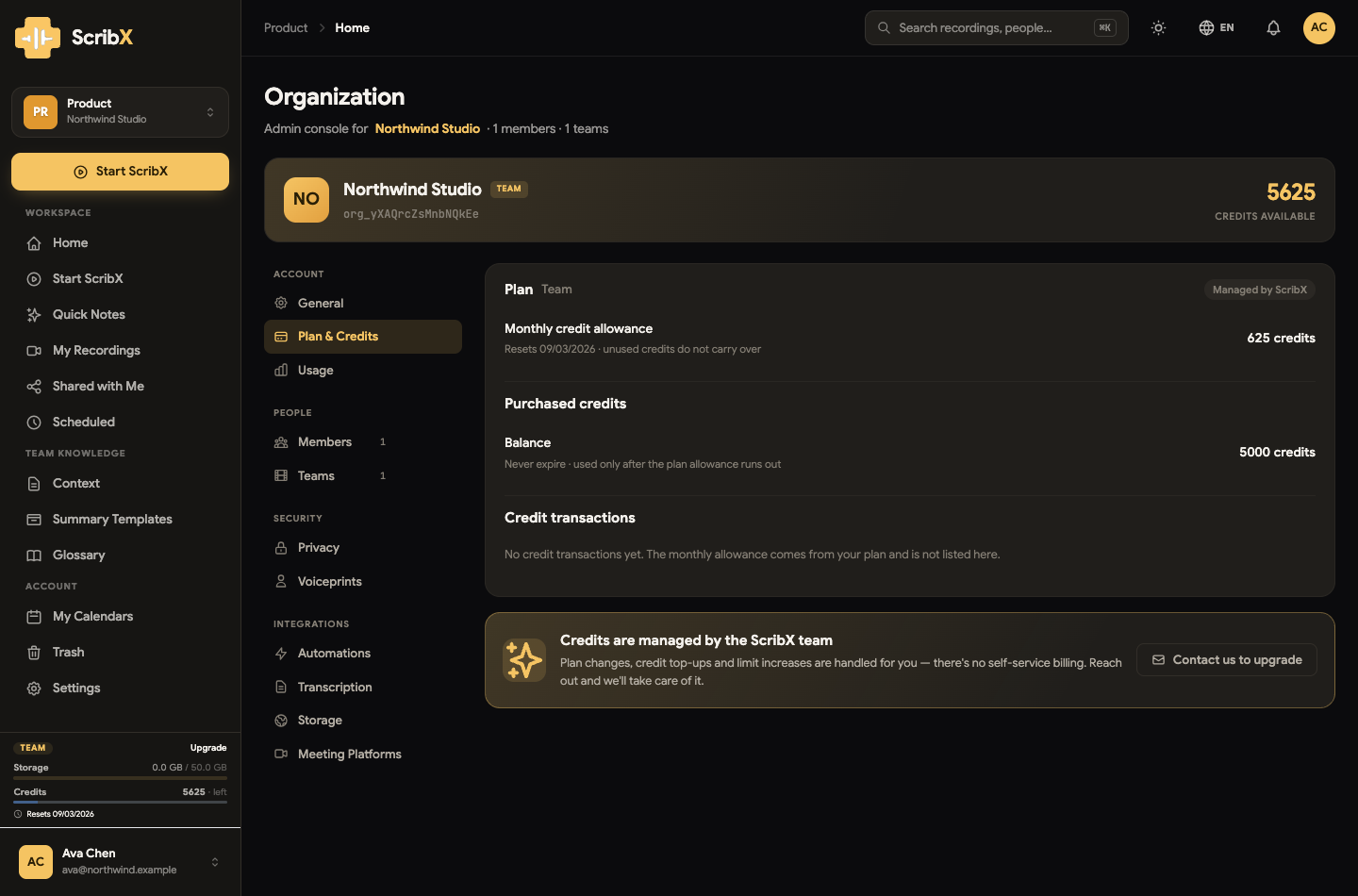 123
123- 1Your plan, and seats in use
- 2Credits available now
- 3Plan allowance · expiring credits · purchased credits
Plans at a glance
| Free | Pro Pro | Team Team | Enterprise Enterprise | |
|---|---|---|---|---|
| Price | Free | Per month | Per seat, per month (at least 2) | By contract |
| Credits per cycle | 200 | 500 | 625 per seat, pooled | By contract |
| Concurrent meetings | 1 | 2 | 5 | 50 |
| Meeting length cap | 60 min | 120 min | 120 min | No cap |
| Voice recordings per cycle | 10 | 100 | 100 | Unlimited |
| Voice recording length cap | 30 min | 60 min | 60 min | No cap |
| Storage | 5 GB | 20 GB | 50 GB | 100 GB |
| Media retention | 30 days | 90 days | 90 days | Kept indefinitely |
| Glossary terms | 25 | 100 | 100 | Unlimited |
| AI summary, translation, context, summary templates | ✓ | ✓ | ✓ | ✓ |
| Calendar auto-join | ✓ | ✓ | ✓ | ✓ |
| Voiceprints in your own teams | ✓ | ✓ | ✓ | ✓ |
| Invite members & shared teams | — | — | ✓ | ✓ |
| REST API, webhooks & MCP server | — | — | ✓ | ✓ |
| Shared context library | — | — | ✓ | ✓ |
| Voiceprints shared org-wide | — | — | — | ✓ |
| Bring your own STT key & storage | — | — | — | ✓ |
| Your own Zoom App & meeting-platform sign-ins | — | — | — | ✓ |
| Priority support & SLA | — | — | — | ✓ |
Every number above belongs to the organization, not to you personally — credits, storage and concurrency are shared by everyone in it. Your admin can also hold a per-organization override, so what you see in the app wins over this table.
Free
200 credits a cycle — roughly three hours of captured meeting — with the full AI write-up, translation, context sources, a 25-term glossary, calendar auto-join and voiceprints. No credit card. It's a one-person plan: you get your own personal team and can't invite anyone.
Pro Pro
Everything in Free, with more room: 500 credits a cycle, plus extra credits you can buy, two meetings at once, two-hour meetings, 20 GB of storage, 90-day media retention and a 100-term glossary. Still a one-person plan. To add a second person, choose Team.
Team Team
Everything in Pro, for a group. Team is sold per seat — at least two — and the allowance is pooled per seat (625 credits each), so it grows as you add people. Adds shared teams and invitations, five concurrent meetings, 50 GB of storage, the shared context library, and the tools for developers: REST API, webhooks and the MCP server.
Enterprise Enterprise
Everything in Team, plus the controls a larger organization needs: Organization admin & controls, bring-your-own STT key and storage, your own Zoom App and meeting-platform sign-ins, voiceprints shared org-wide, 50 concurrent meetings, no meeting-length cap, media kept indefinitely, and priority support with an SLA. Credits and storage are set in the contract. Talk to us for pricing.
Seats
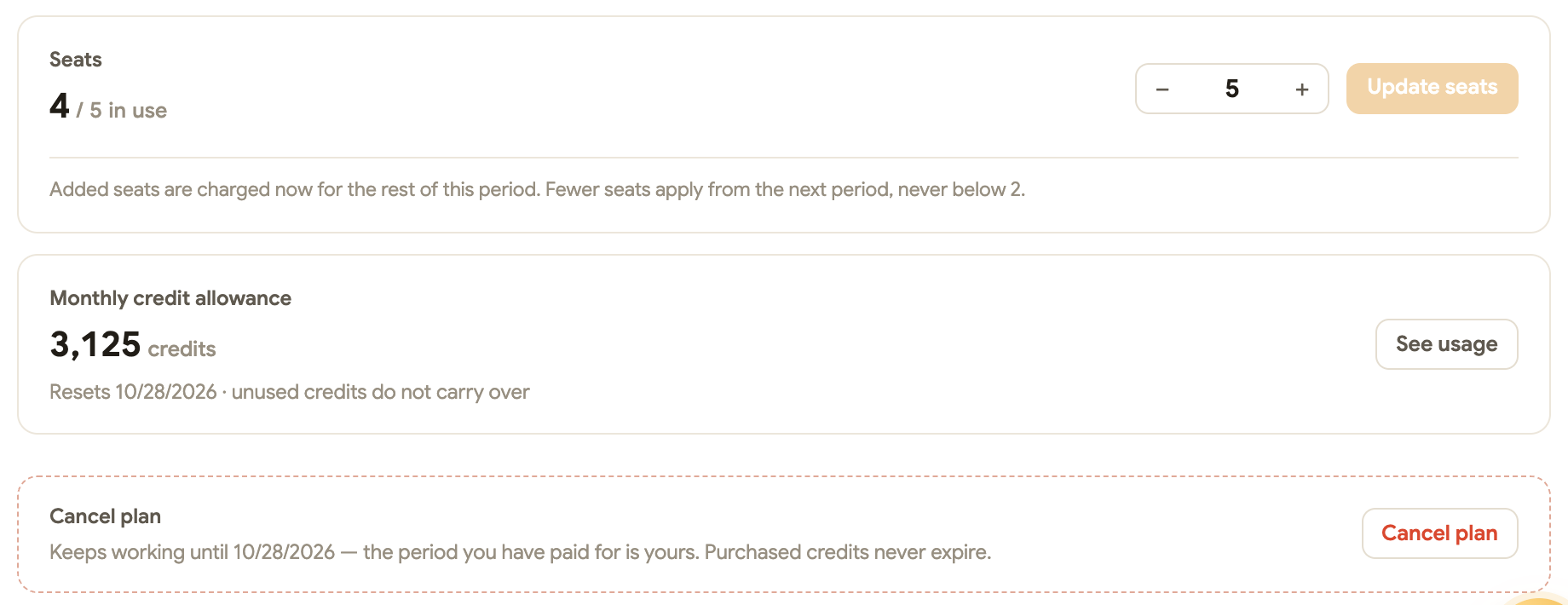
On the Team plan, every person in the organization takes a seat. Profile & settings → Organization → Billing → Plan shows how many are in use and a stepper to change them:
- Adding seats takes effect at once; the added seats are charged for the rest of the current period.
- Removing seats takes effect from the next period, and never below two or below the number of people already in the organization.
- When every seat is in use, new invitations are refused until seats are added or someone leaves.
Enterprise is not capped by seats; it is billed on the people in the organization.
Credits & usage
A credit is one minute of a meeting that ScribX transcribes. Other kinds of capture cost less per minute:
| What you captured | Credits per minute |
|---|---|
| A bot meeting transcribed by ScribX | 1 |
| A bot meeting reading the platform's own captions, or using your own STT key | 0.25 |
| A voice recording from your mic | 0.5 |
| Live captions in the extension — no bot | 0 |
| An uploaded recording | 0.4 |
| A bot that was never let into the meeting | 0 |
| Translating a finished meeting into one more language | 0.2 per meeting minute, per language |
| Read aloud — the translation spoken to you | 0.5 per minute of speech |
ScribX layout costs a flat 10 credits per meeting, on top of the capture. Translating or rewriting that same report is not charged again. Translating a meeting live for two or more other languages uses extra credits.
What never costs credits
After the audio is captured, these things are free on every plan:
- Generating and regenerating the write-up, in any built-in summary template and any language — except ScribX layout, below
- Translating the transcript live, into the languages set for the meeting
- Chapters during the call
- Asking questions about your meetings
- Voiceprint enrollment and speaker labels
- Editing, sharing and exporting
- Storing the recording — that counts in GB against your storage quota, not against credits
When the allowance runs out
New bot meetings and voice recordings are refused until the cycle resets or an admin tops up. Two things keep working regardless: live captions in the extension, which cost nothing because no bot and no ScribX transcription is involved, and everything you've already captured.
Your cycle resets on your organization's signup anniversary each month — not on the 1st. The exact date is on the usage meter.
Two kinds of credit
- The plan allowance resets every cycle, and unused credits don't carry over.
- Purchased credits sit in a separate balance. They never expire and are only drawn on once the plan allowance for the cycle is gone.
Track usage
The meter at the bottom of the sidebar shows every member the plan, the storage used and the credits left, with the reset date. On a phone, the same meter is in the Compact mode Settings.
For the details, an organization admin opens Profile & settings → Organization → Usage:
- Overview — credits available now and where they come from (the plan allowance, expiring credits, purchased credits — spent in that order), storage, concurrent recordings, and charts of hours, sessions and credits per day or month.
- Credits used — one row per meeting: when, what, by whom, how long and how many credits. Open a row for the breakdown of what was deducted.
- Credit transactions — credits granted, bought and expired.
Change plan, seats or top up
Billing is in Profile & settings → Organization → Billing, in three tabs:
- Plan — the plan and its status (Active, Trial, Payment overdue, Cancelled), the price and renewal date, the seats, the monthly allowance, Change plan and Cancel plan. An upgrade applies at once and is prorated; a downgrade waits for the end of the period you have paid for.
- Credits — the purchased-credit balance and Buy more. Bought credits never expire.
- Payments & invoices — the saved card (or Link by Stripe) and every payment with its invoice.
Payments are handled by Stripe: card details are entered on Stripe's page and never reach ScribX, and Stripe sends the receipts and invoices. ScribX emails the organization's admins about what Stripe cannot know — seats added or reduced, a declined automatic payment, a plan that has ended.
Some organizations do not have self-service billing yet. Their Billing page reads Credits are managed by the ScribX team, and Contact us to upgrade reaches us instead: plan changes, credit top-ups and limit increases are then handled for you.
Nothing is deleted when an organization moves to a smaller plan. The library shows the window that plan covers (30 days on Free, 90 on Pro and Team) and the rest comes straight back when you upgrade. Moving to a one-person plan keeps one person in the organization — see When a plan ends.