Playing the recording
Every meeting opens as a note. The note has the summary, your own notes, the chapters and the transcript. The recording (the video or the sound) is in the panel on the right. This page explains only the recording.
Where it plays
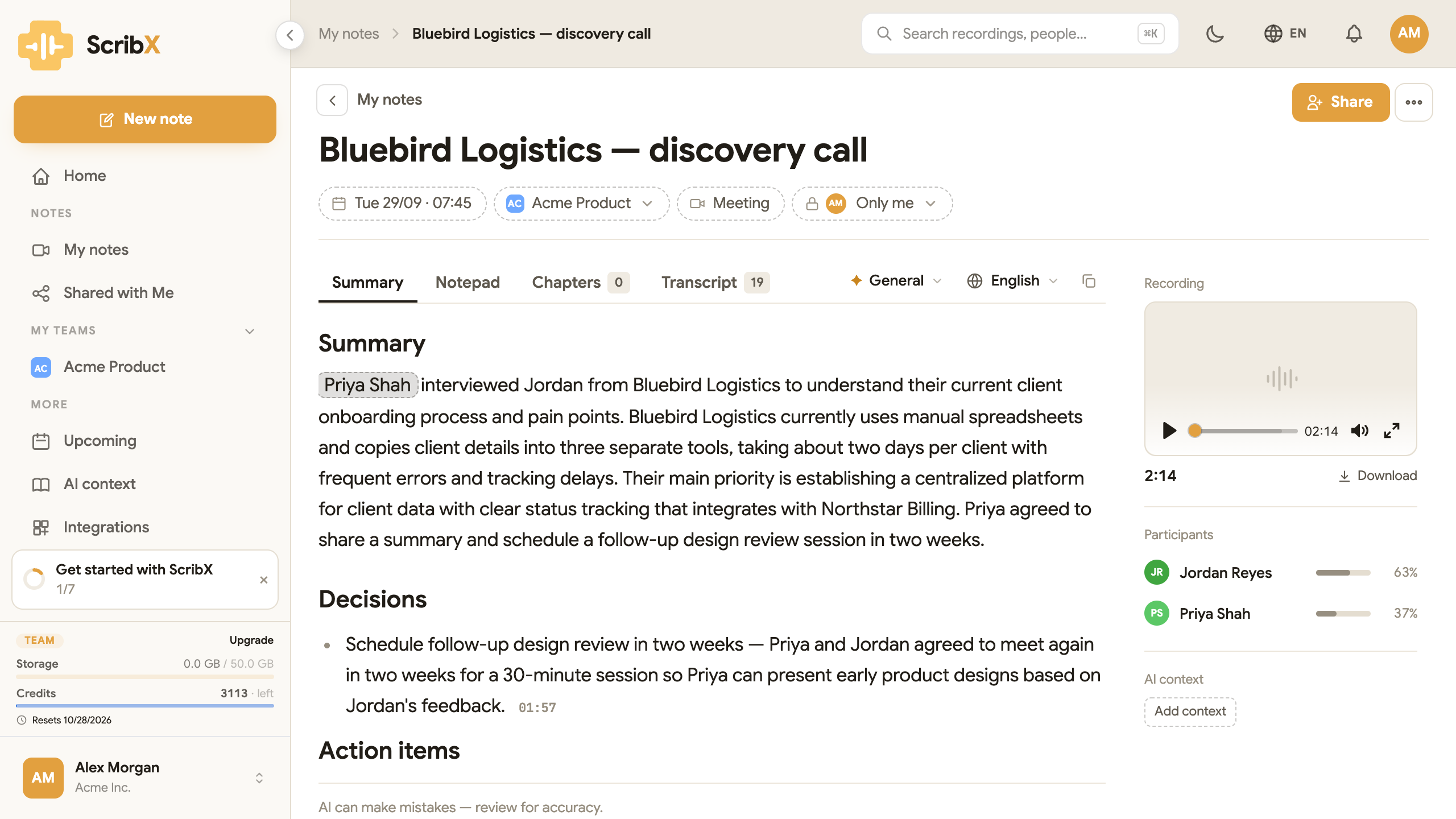 1234
1234- 1The player
- 2Download the file
- 3Click a time to play from there
- 4Transcript tab
Open a note. The player is at the top of the right-hand panel, under Recording. On a phone, the player is at the top of the note.
Use the player
The player has these controls:
- Play / Pause: the button on the left.
- The bar: drag the dot, or click on the bar, to go to another moment.
- The time: how long the recording is.
- Mute: the speaker button turns the sound off and on.
- Full screen: the button on the right shows the video on the whole screen.
Under the player you see the length of the recording and Download. Click Download to save the file to your computer.
Play from a moment
You do not need to search the recording by hand:
- From the transcript: open the Transcript tab and click a line. The recording plays from the moment that line was said.
- From the summary: many points in the summary end with a time, for example 01:57. Click it. ScribX opens the Transcript at that moment and plays the recording from there.
While the recording plays, the transcript line and the chapter that are playing are highlighted.
When there is nothing to play
Some notes have no recording. The panel then shows a message instead of a player. The message says what happened:
| Message | What it means |
|---|---|
| Video is being processed / Audio is being processed | The file is still being prepared. It will be ready in a few minutes. You can already read the transcript. |
| No video for this meeting / No audio for this session | Only the transcript was kept, or the meeting was not recorded. For example, the recording format was Transcript only. |
| Video has expired | Your organization's storage rules removed the file. The transcript and summary are kept. |
| Video was deleted | Someone deleted the file. The transcript and summary are kept. |
| Video could not be saved | Something went wrong while recording. Contact support if you need this recording. |
| Video can't be opened | The browser could not play the file. Reload the page. Contact support if it keeps happening. |
| This video won't play here | The file is in a format that browsers cannot play (for example .mkv, .avi or .wmv). Click Download to watch it on your computer. See Upload a recording. |
For an audio-only note, the messages say Audio instead of Video.
What you can see and do on a note depends on your role and the note's team. See Teams & roles.
What's next?
- The note page: the summary, notepad, chapters and transcript
- Transcript & translation
- Share a note
- Recording & summary settings: choose video, audio only or transcript only