Share links & access codes
A share link lets someone read the notes of a meeting and play its recording without a ScribX account. By default the link is protected with an access code. You can stop the link at any time.
Make a link
- Open the note and click Share at the top right. (You can also use the extension panel.)
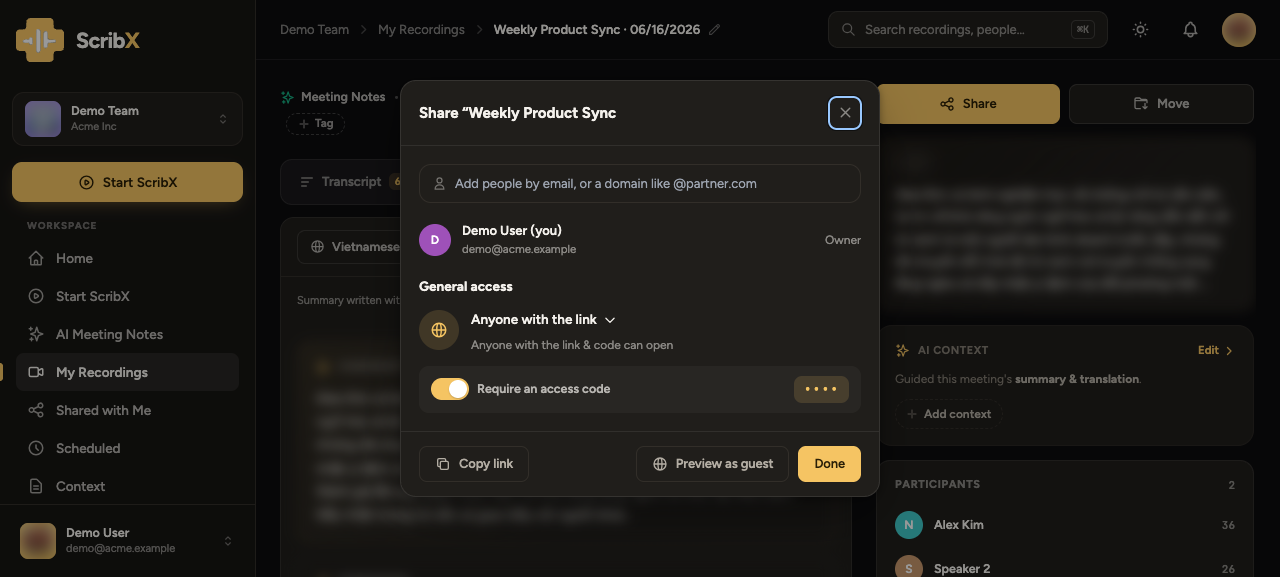
- Under General access, open the menu and pick Anyone with the link. The line under it now says "Anyone with the link & code can open".
- Require an access code is on by default. ScribX shows the code next to it. Click the copy icon next to the code to copy it.
- Optional: turn on Include the written notes if the guest may also read your Notepad.
- Optional: click Preview as guest to see what the guest will see.
- Click Copy link. Then click Done.
 12345
12345- 1General access
- 2Require an access code
- 3The code: click to copy
- 4Preview as guest
- 5Copy link
ScribX shows the access code only when it makes the link. Copy it before you close the box. If you lose it, click the code area to make a new code. The old link and code then stop working, and you must send the new ones.
Send the link and the code
Send the link and the access code in two different messages. For example, send the link by email and the code in a chat. Then a person who sees only one message cannot open the meeting.
The guest opens the link in a browser. No sign-in is needed. A page asks for the code: "This recording is protected. Enter the passcode to view." The guest types the access code and clicks View Recording. The code is case-sensitive.
If you do not want a code, turn off Require an access code before you copy the link. Then anyone who has the link can open the meeting.
Stop a link
- Open the note and click Share.
- Under General access, pick Restricted (or your team, or your organization).
- Click Done.
The link stops working at once for everyone who had only the link. People you added by email or domain keep their access.
Your organization can turn off public links. If you cannot pick Anyone with the link, an admin has turned it off. See Organization admin & controls. Enterprise