Bring your own keys Enterprise
Who this page is for. This page is for the organization admin or the IT team. It explains how to make ScribX use your company's own accounts with outside providers. You can connect your own speech-to-text account (the service that turns meeting audio into text), and you can ask for your recordings to be kept in your own cloud storage. If you are not technical, send this page to your IT team.
Everything on this page is Enterprise. See Plans & billing.
What you can bring
| What | Supported providers | Where it is set |
|---|---|---|
| Speech-to-text key (transcription) | Soniox, Deepgram, OpenAI Whisper, Speechmatics | You set it yourself: Settings → Organization → Meeting preferences → Transcription |
| Cloud storage (recordings and transcripts) | Amazon S3, Google Cloud Storage, Azure Blob | ScribX sets it up for you: contact your account team |
Summaries, translations and chat always run on ScribX's own AI accounts. You cannot connect your own AI account for them.
Why companies do this
- Control over data. Audio goes to a provider account that your company owns.
- Billing. The provider bills your company directly, under your existing contract.
- Compliance. Some companies must process data only under their own agreements.
Before you start
- Your organization is on the Enterprise plan.
- You are an organization admin.
- You have an API key from one of the four supported providers. Your IT team creates it in the provider's own website. Some accounts also need a region or endpoint address.
Connect your speech-to-text key
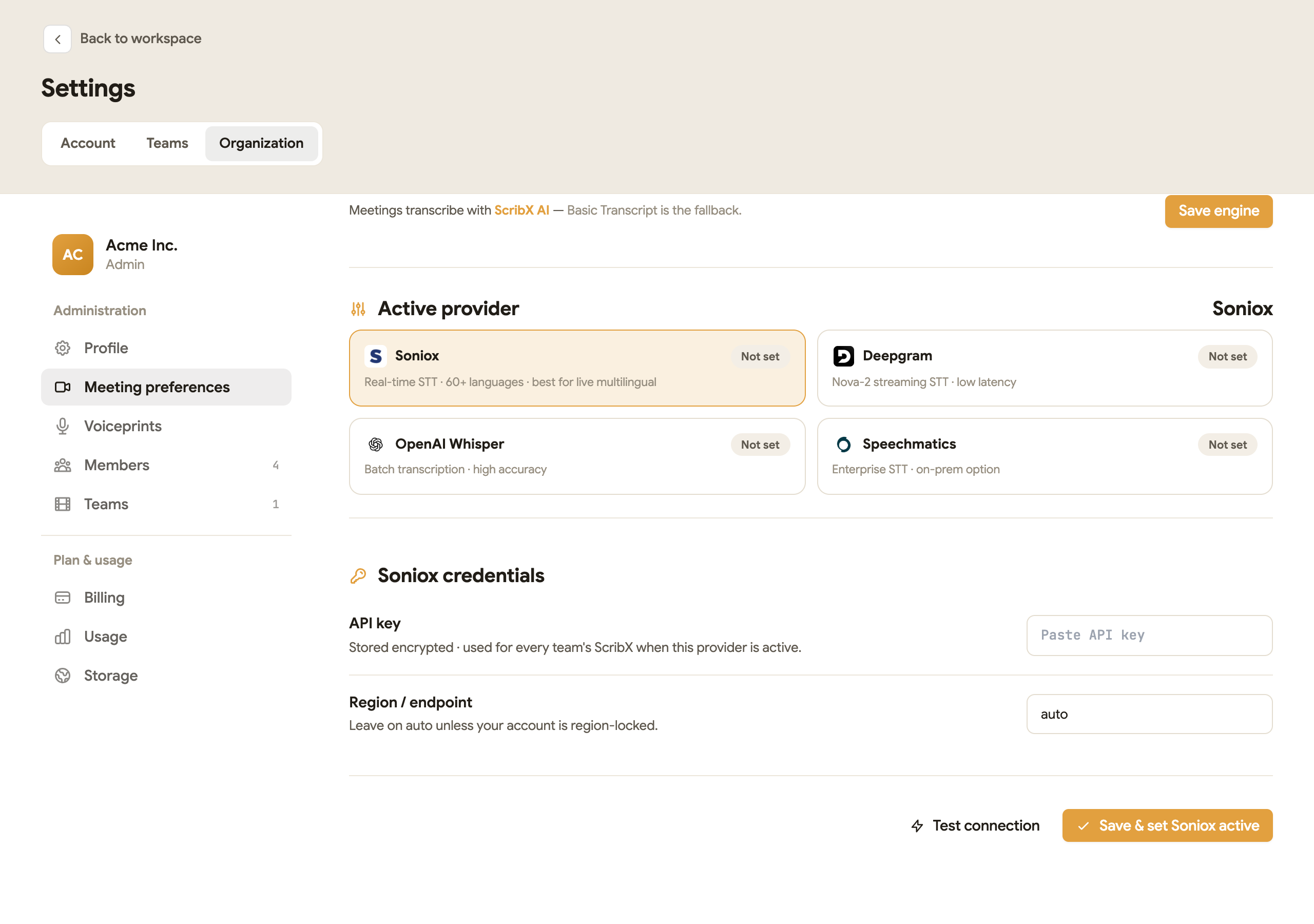 12345
12345- 1Save engine
- 2Pick your provider
- 3Paste the API key
- 4Test connection
- 5Save and make it active
- In the web app, click your avatar (top right), then click Organization.
- On the left, click Meeting preferences. Stay on the Transcription tab.
- Under Transcription engine, click the ScribX · Your Key card. More settings open below.
- Under Active provider, click your provider: Soniox, Deepgram, OpenAI Whisper or Speechmatics.
- In API key, paste the key from your provider.
- Leave Region / endpoint on
auto, unless your provider account is locked to one region. In that case, type the region or address your IT team gives you. - Click Test connection. ScribX checks the key with the provider and tells you if it works.
- Click Save & set active. The provider card now shows Active.
- Scroll up and click Save engine.
What you'll see
- The line next to Save engine says which engine meetings now use.
- New meetings in every team are transcribed with your provider account. Teams cannot change this. Their settings page shows the engine as read-only.
- Meetings that already ended do not change.
- ScribX still counts 0.25 credit per minute for a bot meeting on your own key. Your provider bills you for the transcription itself. See Credits.
ScribX saves your key encrypted, so it cannot be read as plain text. The page only shows the first and last few characters of the key.
Change or stop using your key
- To switch provider: repeat steps 4–8 with the other provider, then click Save engine.
- To stop using your key: click the ScribX · Your Key card again to clear it, then click Save engine. Meetings go back to ScribX AI.
Keep recordings in your own storage
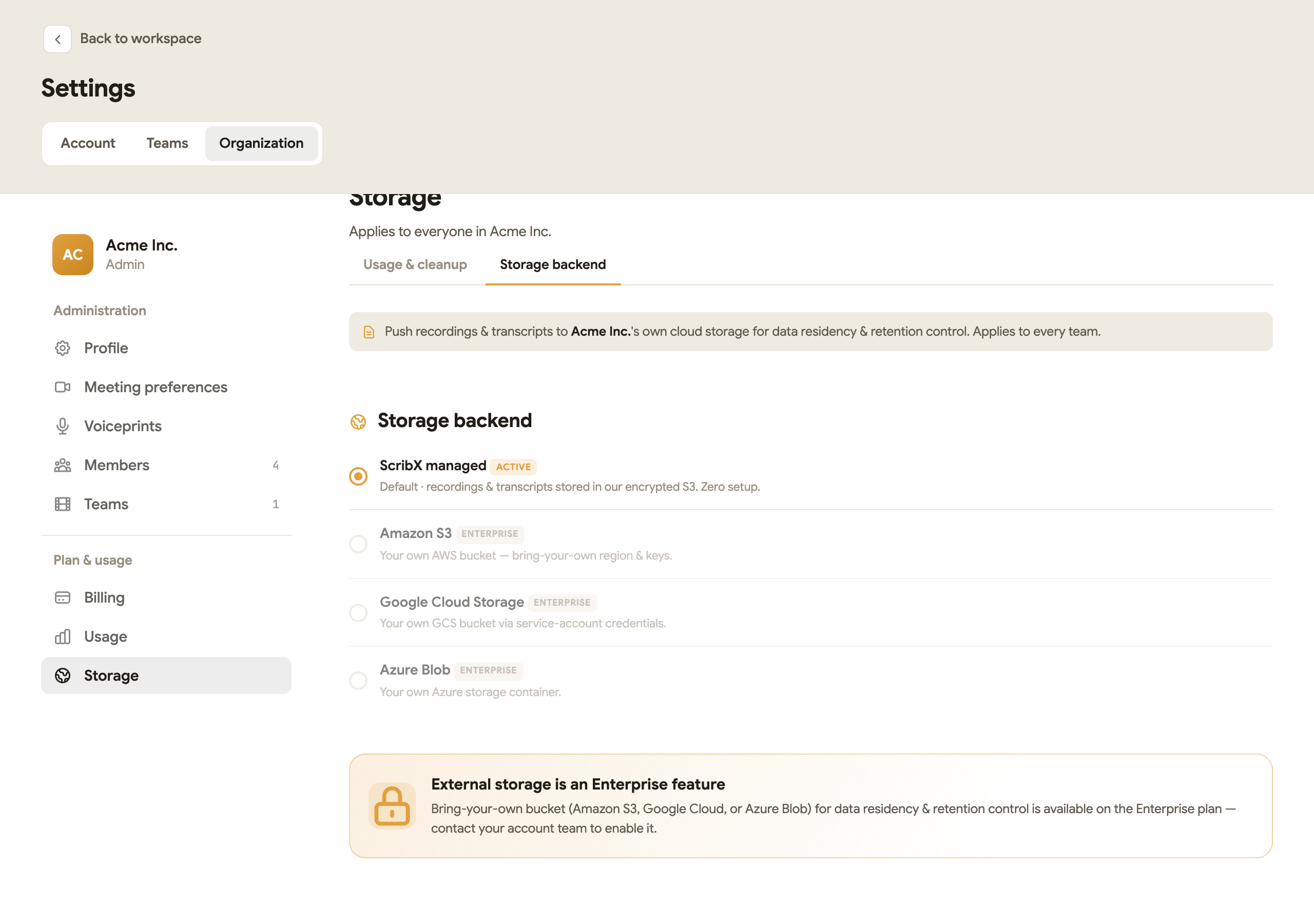 12
12- 1Storage backend tab
- 2Where recordings are kept
By default, ScribX keeps recordings and transcripts in its own encrypted storage (ScribX managed). An Enterprise organization can keep them in its own cloud storage instead: Amazon S3, Google Cloud Storage or Azure Blob.
You cannot turn this on yourself in the app. To see the options:
- Click your avatar, then click Organization.
- On the left, click Storage, then click the Storage backend tab.
To use your own storage, contact your ScribX account team. They set it up with your IT team. The choice applies to every team in the organization.