The note page
Every meeting opens as a note: one page that holds the write-up, anything you typed during the call, the chapters and the full transcript. It is the same page whether the meeting was captured by a bot, recorded from your microphone, or uploaded as a file — and the same page before, during and after the meeting.
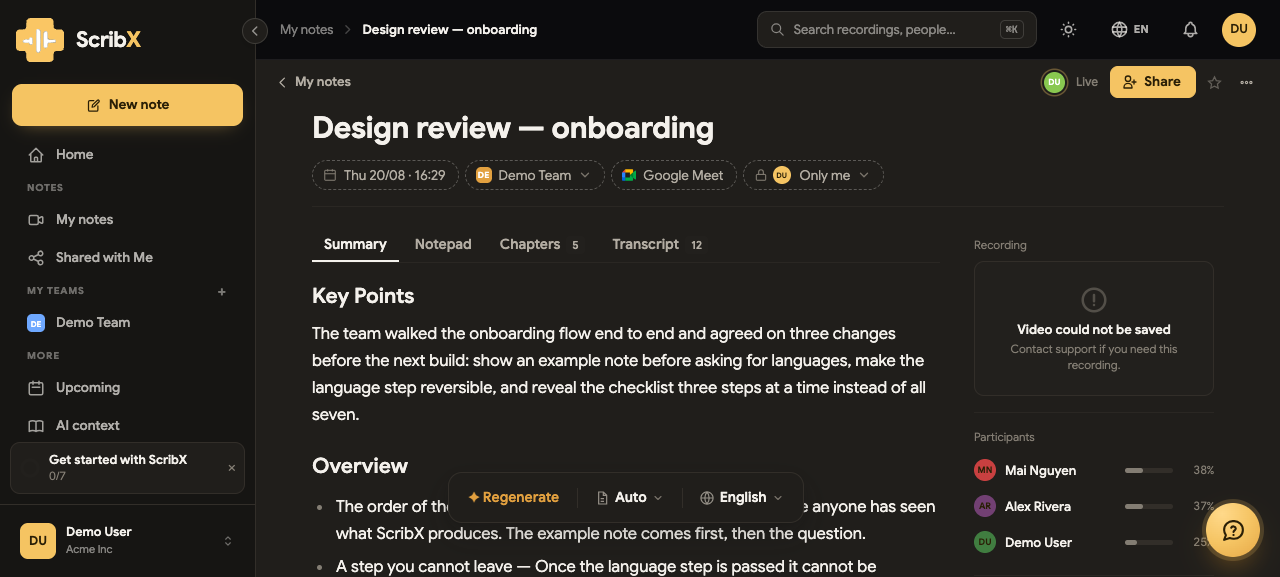 1234
1234- 1The title — click to rename it
- 2Properties: when, whose team, where it came from, who can see it
- 3Summary, Notepad, Chapters, Transcript
- 4Share — add people before granting access
The title and the properties
The title (①) is the meeting's name. ScribX takes it from the calendar event, the meeting's own name in Zoom or Meet, or the file you uploaded — and you can click it and type a better one at any time. It changes everywhere the meeting appears.
Under it sits one line of properties (②), each a chip you can open:
- when it happened
- which team it belongs to — the team decides who can reach it
- where it came from — the platform's own mark, a microphone, or an upload
- who can see it — Only me until you share
The four tabs
Summary — what ScribX read out of the whole transcript: the key points, the decisions and the action items, written in the format you chose. If it has not been written yet, the tab says so and offers to write it.
Notepad — yours. Type during the meeting or after it, in a full editor: headings, lists, tables,
highlights and / commands. It is your writing, kept apart from what ScribX wrote, and it is part
of the same page so nobody has to look for it. See working together for
notes several people write at once.
Chapters — the meeting broken into sections, so a two-hour call is something you can skim.
Transcript — every line, with who said it and when. Click a line to jump the recording to it. Read it in any language you like, including as it was spoken.
The rail
The column on the right holds what the meeting was, rather than what was said in it:
- the recording, playable in place — or an honest line saying why there is nothing to play
- the participants, with how much of the meeting each of them spoke
- the context and the glossary the meeting ran with
A note whose media could not be kept says so here, plainly, instead of showing a player that will never start.
Before and during the meeting
The note exists before the meeting does. Start one, and you can name it, file it in a folder, share it and type into it while it is still empty — then point it at a meeting when you are ready.
While the meeting runs, the same page shows the live transcript and the translation beside it, and you can keep typing in the Notepad throughout. Nothing moves when the meeting ends; the page simply gains its summary.