Transcript & translation
Every meeting keeps its full transcript next to the write-up. Each line shows who spoke and when. You can read the transcript in the language it was spoken, or in your own language.
The transcript
To open it, open a note and click the Transcript tab. The number on the tab is the number of lines.
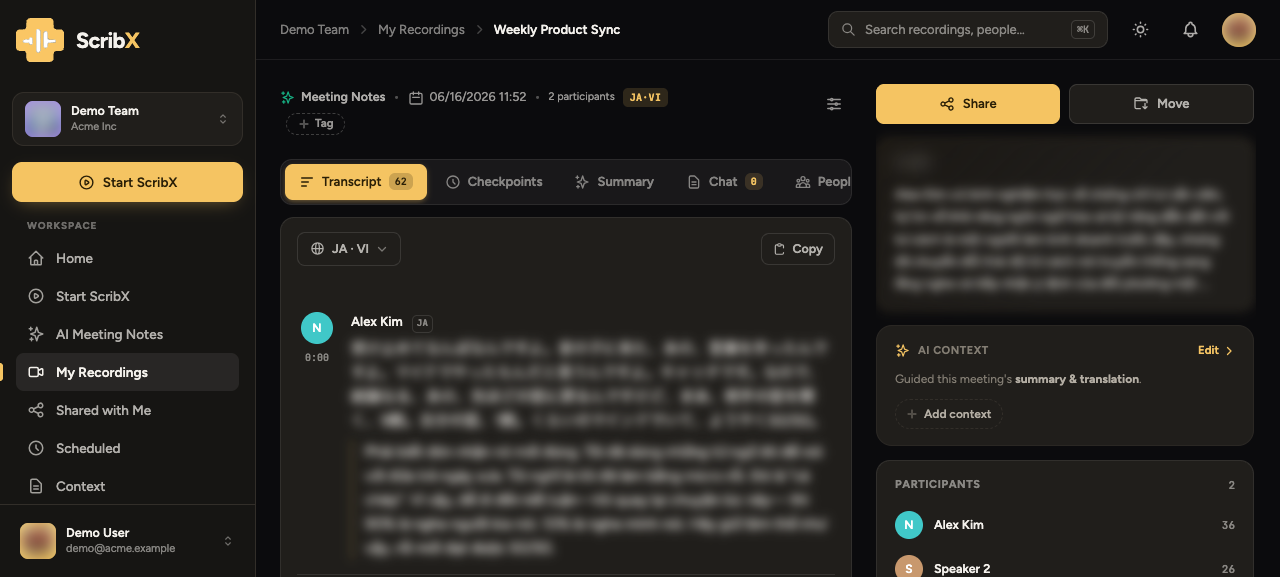 1234
1234- 1Language button
- 2Copy the transcript
- 3Speaker, language and time
- 4Participants
Each line shows:
- The speaker's name.
- A language tag (for example, EN). This is the language the line was spoken in.
- The time in the recording. Click a line and the player on the right jumps to that moment and plays it.
To copy the whole transcript, click the Copy icon next to the language button.
While the meeting is running, the transcript scrolls with the newest line. If you scroll up to read an earlier line, the transcript stays where you are. Click Jump to latest to go back to the newest line.
Read the transcript in another language
The language button is next to the tabs. It shows the language you read in now (for example, English). This choice is only for you. Other people who open the note still see their own choice.
- On the Transcript tab, click the language button.
- Under I read in, pick a language:
- As spoken shows every line in the language it was spoken in. Nothing is translated. Use it when you understand all the languages of the meeting.
- A language name shows every line in that language. Lines spoken in another language are shown translated.
- Optional: next to another language, tick Show alongside. Then you see two languages under each line.
 123
123- 1Language button
- 2As spoken: no translation
- 3Add a language
The language you spoke in is marked original in the menu when the meeting has more than one language.
If only part of the meeting is translated into a language, that language shows Translate the rest in the menu. Click it to translate the missing lines.
Add a language after the meeting
The menu lists the languages the meeting already has. To add another one:
- Click the language button.
- Under Translate this meeting into…, click the language (for example, Japanese).
- Wait a moment. ScribX translates the transcript, the chapters and the summary into that language.
This works for all five ScribX languages: English, Vietnamese, Japanese, Korean and Simplified Chinese.
Adding a language to a finished meeting uses credits: 0.2 credits per minute of the meeting, for each language. For a one-hour meeting, one language costs 12 credits. See Credits & usage.
Translation during the meeting
You choose the translation before the meeting starts, with My language and Others read in:
- Only My language: everything that is said is translated into your language.
- My language and one other: a two-way conversation. Each side's words are translated into the other side's language.
- My language and two or more others: everything is translated into your language and into each other language. This uses extra credits.
You do not need to say which languages people will speak. ScribX recognizes them. See Languages for the steps.
During the meeting, the translation appears under each line as the person speaks. If you add a language during the meeting, ScribX also translates the lines that were already said.
Name the speakers
In some notes the speakers are called Speaker 1, Speaker 2 and so on. This happens in recordings made on your device and in uploaded files. ScribX can hear that the voices are different, but it does not know the names.
- On the right side of the note, find Participants.
- Click a speaker, for example Speaker 1.
- Type the name and press Enter.
The new name appears everywhere: in the transcript, in the summary and in every new version of the summary. After you rename speakers, you can regenerate the summary so it uses the names.
In meetings that ScribX joined, the names come from the meeting platform. Voiceprints can also name colleagues who recorded a voice sample.
You cannot change the words of a transcript line. To fix a wrong word in the summary, click into the summary text and type. See The write-up.