Focus mode & panels
Focus mode shows the live meeting in a large, separate window. The text is big, so people can read it from across a room. You can show up to four panels side by side, for example the original speech in one panel and the translation in another. Use it on a second screen, on a meeting-room TV, or when you share your screen.
Before you start
- You are in a Google Meet or Zoom call in your browser, with the extension installed.
- ScribX is capturing the meeting. See Capture from the extension.
The side panel
During a call, ScribX shows a side panel next to the meeting. The buttons at the top of the panel control what you see.
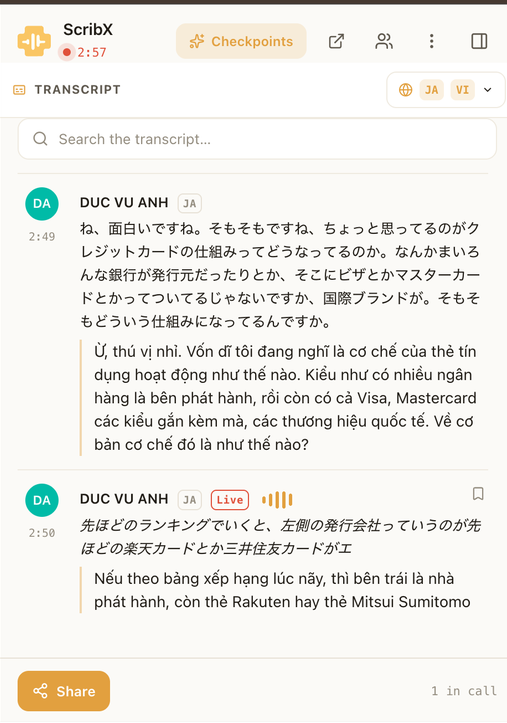 12345
12345- 1Show the chapters section
- 2Pop out: open focus mode
- 3People
- 4More (⋮)
- 5Close the side panel
In the side panel you can also:
- Show the chapters. Click the button with the sparkle icon at the top of the panel. A chapters section opens under the transcript. Drag its top edge to make it taller or shorter. Click × on the section to close it.
- Move the panel. Click ⋮ (More), then Move to left or Move to right.
Open focus mode
- At the top of the side panel, click the pop-out icon (a square with an arrow, "Pop out to new window").
- A new window opens. Drag it to your second screen or TV, and make it full screen if you like.
You can also open focus mode from the transcript's language menu: click Side by side.
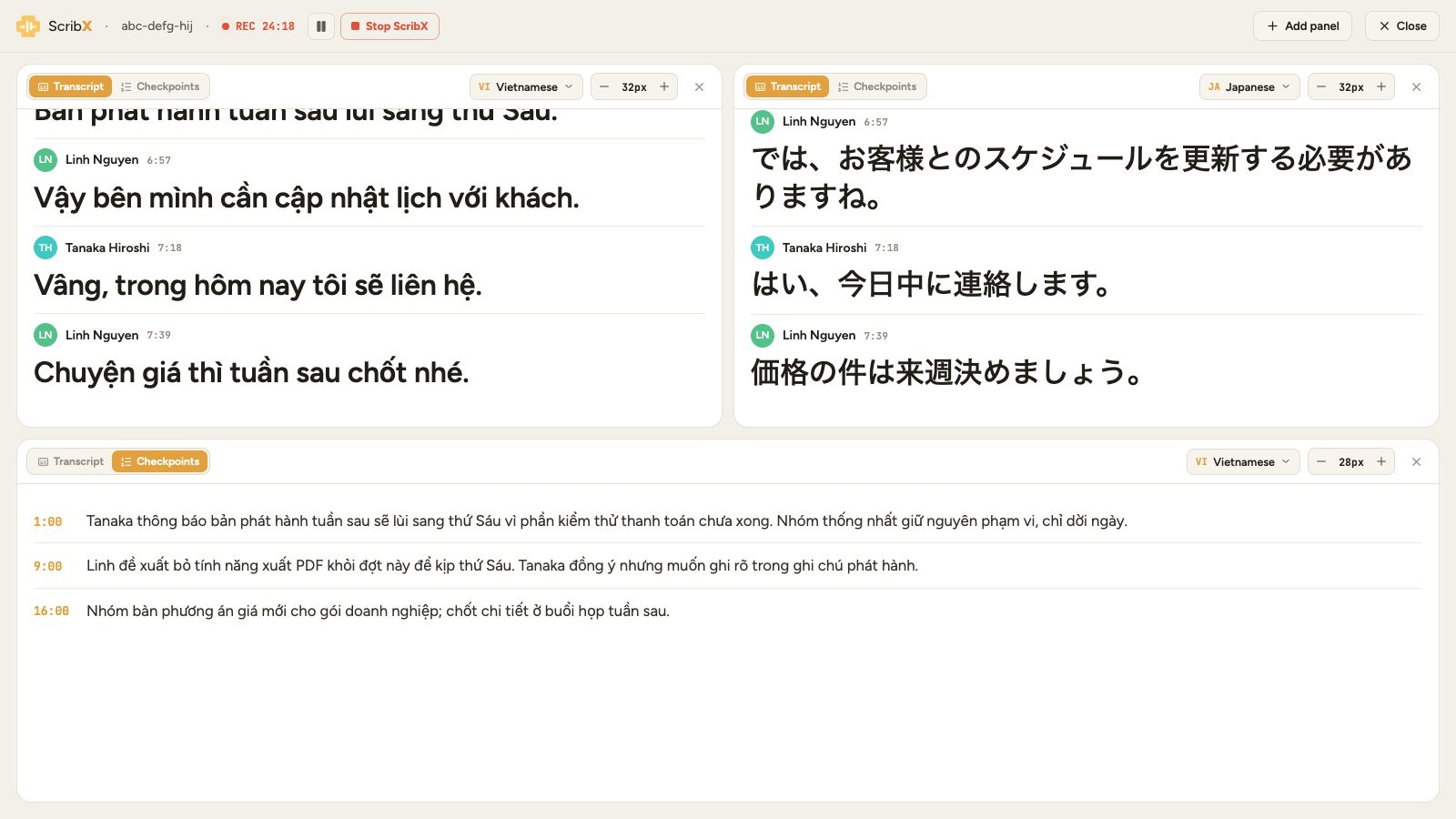 123456
- 1Switch: Transcript or chapters
- 2Language for this panel
- 3Text size
- 4Remove this panel
- 5Add panel
- 6Close focus mode
Set up the panels
Each panel has its own controls at the top:
- Transcript or chapters. Click Transcript to show what people say, or the other tab to show the chapters.
- Language. Click the language menu and pick a language. Choose Original to show the words as they were spoken.
- Text size. Click − or + to make the text smaller or larger.
- Remove. Click × to close the panel.
To add a panel, click Add panel at the top right. You can have up to four panels. When you have four, the Add panel button disappears.
For a bilingual room, open two panels and set one to each language. Everyone can read the meeting in their own language.
Pause or stop from focus mode
If you started ScribX in this meeting, the top bar also has a pause button and Stop ScribX. When you click Stop ScribX, ScribX asks you to confirm. Then ScribX leaves the meeting and saves what it has captured so far.
Close focus mode
Click Close at the top right. The side panel in the meeting stays open.
Focus mode is not the same as in-meeting captions. Captions are a small subtitle bar over the meeting video. Focus mode is a separate, large window.