Folders
A folder is a place you come back to: this client, this project, this board. Put notes in it, or start a note inside it and it arrives already filed.
A folder is also the simplest way to answer "who can see this", because a folder says who it is for — and everything in it follows.
Make one
From My notes or a team's library, press Folder.
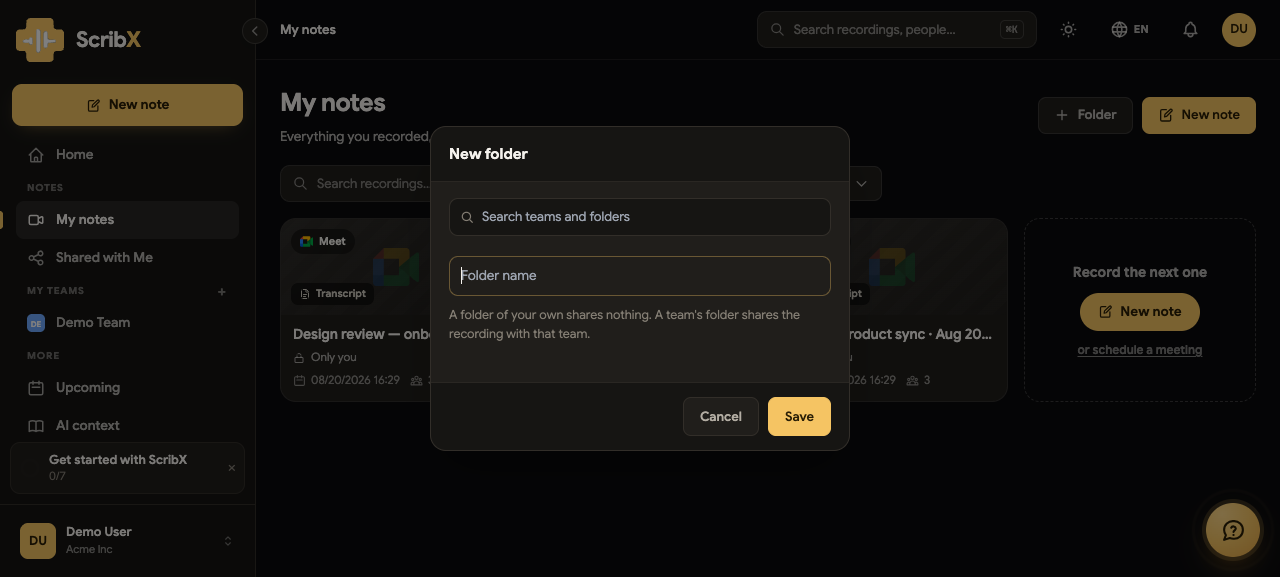
Give it a name, and choose where it lives:
- A folder of your own shares nothing. It is a shelf in your own space.
- A team's folder shares what goes into it with that team. The team decides who its members are, so the folder does not need its own list of people.
The dialog says this in the same words, so the decision is made at the moment it matters rather than discovered later.
Filing a note
Two ways, and they end up the same:
- Drag a note onto a folder, or use Move to folder from the note's ⋯ menu.
- Start the note inside the folder. Open the folder first and press New note, and the note is created there — and shared the way that folder is, from its first second.
That second one matters more than it sounds. A note started in a team's folder is visible to the team while the meeting is still running, which is the point of recording it for them.
What a folder's card counts
A folder shows how many notes it holds — counting what you can open, not what is in it. If a teammate's private note sits in a shared folder, their note is not advertised to you by a number you cannot account for.
Moving a note between folders
Moving a note between folders of different kinds changes who can read it, and the product tells you so before it happens. Moving a note out of a team folder into your own space takes it back to Only me; moving it the other way shares it with that team.