Access requests & guest access
Sometimes a person in your meeting opens the ScribX side panel but cannot see the transcript. They can ask you for access. People without a ScribX account can follow the meeting too, with a share link and a passcode. This page explains both.
Two ways to let someone in
| Who | What they do | What you do |
|---|---|---|
| A ScribX user who has no access to your recording | Clicks Request Access in their side panel | Click Approve or Deny |
| A guest with no ScribX account | Opens your share link and types the passcode | Send them the link and the passcode |
Both give view-only access. A guest or an approved person can read the transcript and summary. They cannot start, stop or change the recording.
When someone asks for access
A ScribX user in the same meeting who does not have access sees Access Restricted in their side panel. They click Request Access (or Request access from host). If they are not signed in, they see Sign in to request access first.
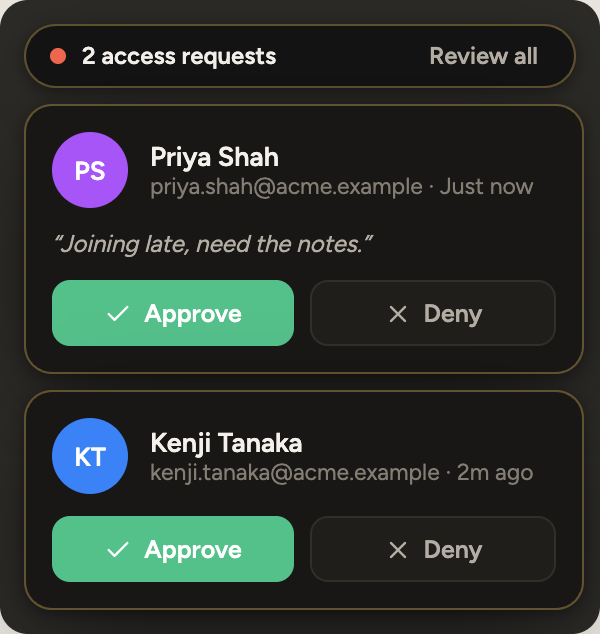
You then see a request card at the top of the screen, next to the ScribX side panel.
 123
123- 1Review all requests
- 2Approve
- 3Deny
- Read the name, the email and the message on the card.
- Click Approve to give view access, or Deny to refuse.
- If several people ask at once, click Review all to see every request in one list.
You can also open the list later. At the top of the side panel, click ⋮ (More), then Access Requests. The number shows how many requests are waiting.
The other person sees Access Approved - Refreshing... and the transcript opens. If you deny the request, they see Access Request Denied and can click Retry Request.
Answer from your email
ScribX also sends you an email for each request. You can answer without opening the meeting.
- Open the email. It shows who is asking and their message.
- Click Approve access or Deny. To check the recording first, click Open the recording to review it first.
- If you are not signed in, ScribX asks you to sign in. Then it brings you back to the request.
- On the page that opens, confirm with Approve — grant view access or Deny request.
People forward emails. The sign-in step makes sure that only you can open your recording to someone else.
Who can answer a request
- The person who started the recording (the owner) can answer.
- People the owner gave Editor access to can answer.
- An organization admin cannot answer only because they are an admin. Access to one recording is decided per recording, not by the admin role.
Let a guest in with a link and a passcode
Every meeting that ScribX captures with a bot has one share link and one passcode. Guests don't need a ScribX account or the extension.
As the owner:
- At the bottom of the side panel, click Share.
- In Share transcript, click Copy link & passcode.
- Send the text to your guests, for example in the meeting chat.
See Share from the extension for the full steps. Other people in the meeting who can see the transcript can also find the passcode: they click ⋮ (More), then Meeting info, and look under Guest Passcode.
As a guest:
- Open the share link in your browser.
- On the page that says This recording is protected, type the passcode. The passcode is case-sensitive.
- Click View Recording. The live transcript opens, view-only.
A guest who has the ScribX extension can also use it:
- In the extension popup, paste the link under Have a share link?. Then type the passcode.
- Or, if you are not signed in, open the side panel in the meeting. Click I have a passcode and type the passcode from the host.
In the extension, a guest can only follow a meeting that a ScribX bot is capturing now. If there is no active ScribX bot, the guest sees Cannot Access Transcript.