Upcoming meetings & calendar
Connect your Google or Microsoft calendar once. ScribX then shows your next meetings on the Upcoming page. You can choose which meetings to record, or let ScribX join them automatically. Each recorded meeting gets a note with a full write-up.
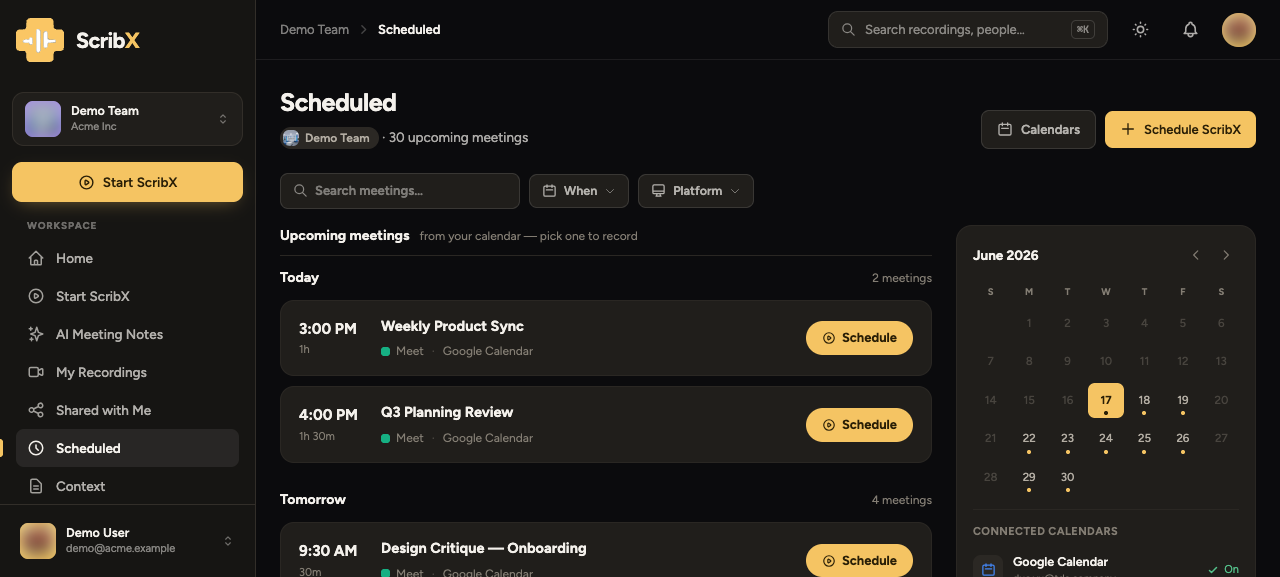
To open the page, click Upcoming in the sidebar (under MORE). It shows your calendar meetings grouped by day, a month calendar, and your connected calendars.
 1234
1234- 1Connect a Google or Microsoft calendar
- 2Schedule — record this meeting
- 3Click a day to jump to it
- 4Connected calendars and their rules
Connect your calendar
- In the sidebar, click Upcoming.
- Click Calendars (or Connect a calendar if nothing is connected yet).
- Choose Google Calendar or Microsoft Outlook, and sign in to allow access.
- ScribX reads your meetings: titles, times and meeting links. It never changes your calendar.
Your calendars are listed under Connected calendars. See also Integrations.
Record one meeting
After you connect a calendar, your meetings appear on the Upcoming page, grouped by day. Each meeting shows its time, platform and link.
- Find the meeting. Use When and Platform to filter the list, or search.
- Click Schedule on the meeting.
- Check the window that opens. It shows which meeting, which team the note will go into, and what ScribX will record. Confirm.
ScribX joins about a minute before the meeting starts.
Repeating meetings
For a meeting that repeats (for example, every Tuesday), you have two choices:
- Schedule — record only this meeting.
- The arrow next to it → Schedule every occurrence — record every meeting in the series. The window tells you how often the meeting repeats before you confirm.
A teammate already scheduled it
If a teammate already scheduled ScribX for the same meeting, the button says Already taken. Only one ScribX bot can join a meeting. The row tells you if you will be able to open the teammate's recording when it is ready.
Let ScribX schedule for you (auto-schedule)
With auto-schedule, ScribX books your meetings by itself. You choose a rule for each calendar.
- In the sidebar, click Upcoming, then Calendars.
- Click a connected calendar to open its settings.
- Under Auto-schedule, choose one option:
- Off — nothing is scheduled for you. You start each recording yourself.
- All meetings — every meeting on this calendar that has a video link.
- Meetings I organize — only the meetings you set up yourself.
- Selected meetings — only meetings that match rules you write. Click Define rules. A rule can check, for example, the meeting title or an email domain.
- Under Record into, choose the team for these notes. Under File in, you can also choose a folder.
Each calendar has its own rule. For example, a work calendar can record everything and a personal calendar can record nothing.
You can still stop ScribX for any single meeting, even just before it starts.
When you switch auto-schedule Off, or choose a stricter rule, ScribX cancels the meetings it already scheduled. If you want to keep them, choose Keep the meetings it already scheduled.
Set the summary language and format for your meetings once. Then every automatic note is written the way you expect.
Schedule a meeting that is not on your calendar
For a meeting that is not in your calendar, click New note, paste the meeting link, and choose Schedule instead of joining now. It works like sending a bot, but for a later start time.