Participants & reading languages
The People view in the ScribX side panel lists everyone in the call. Use it to see who is speaking, to set the language each person reads, and to fix a name that looks wrong.
Before you start
- You are in a Google Meet or Zoom call in your browser, with the extension installed.
- ScribX is capturing the meeting with a bot. See Capture from the extension.
Open the People view
- Open the ScribX side panel next to your meeting.
- At the top of the panel, click the People icon (two people).
- To go back to the transcript, click the People icon again, or click × in the People header.
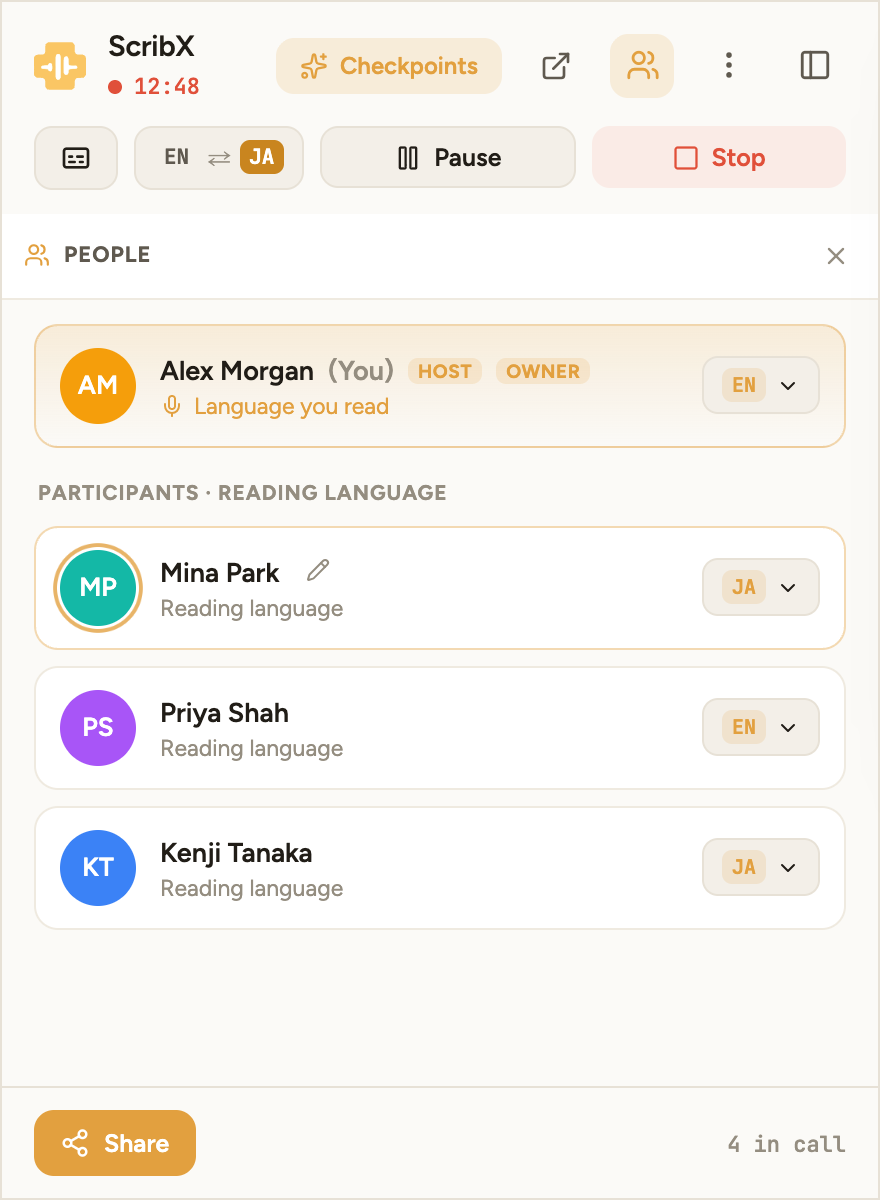 1234
1234- 1People icon
- 2Your reading language
- 3Rename (pencil)
- 4This person's reading language
What you see
ScribX adds people to the list by itself when they join the call. You don't add anyone by hand.
- Your own row is at the top, marked (You).
- Host marks the host of the call.
- Owner marks the person who started ScribX in this meeting. That person controls the recording.
- A person who is speaking now has a ring around their picture.
These labels only describe this call. For who can open a recording in ScribX, see teams & roles.
Set a reading language
Each row has a language button on the right, for example EN or JA.
- Click the language button next to the person.
- Pick a language from the list. The list shows the languages chosen for this meeting.
ScribX saves the choice for that person in this meeting. Everyone who has the side panel open sees the change. Under your own name, the label says Language you read.
To change the languages of the whole meeting, see languages. The list here only offers the meeting's languages.
Rename a speaker
If a name looks wrong, you can change it in your side panel.
- Move the mouse over the person's row. A pencil icon appears next to the name.
- Click the pencil and type the new name.
- Press Enter to save, or Esc to cancel.
The new name appears in your side panel and your live transcript.
A rename is only for you, and only until you reload the page. It does not change the name in the saved note or for other people. To fix a name in the saved note, open the note. Under Participants on the right side, click the name, type the new name and press Enter.