The AI summary
When a meeting ends, ScribX writes a summary of it from the transcript and the chapters. You do not need to write anything.
- In the sidebar, click My notes and open the meeting.
- The Summary tab shows the summary. If it is not ready yet, the tab says that it is being written. The text appears by itself when it is ready — usually within a minute.
What's in the summary
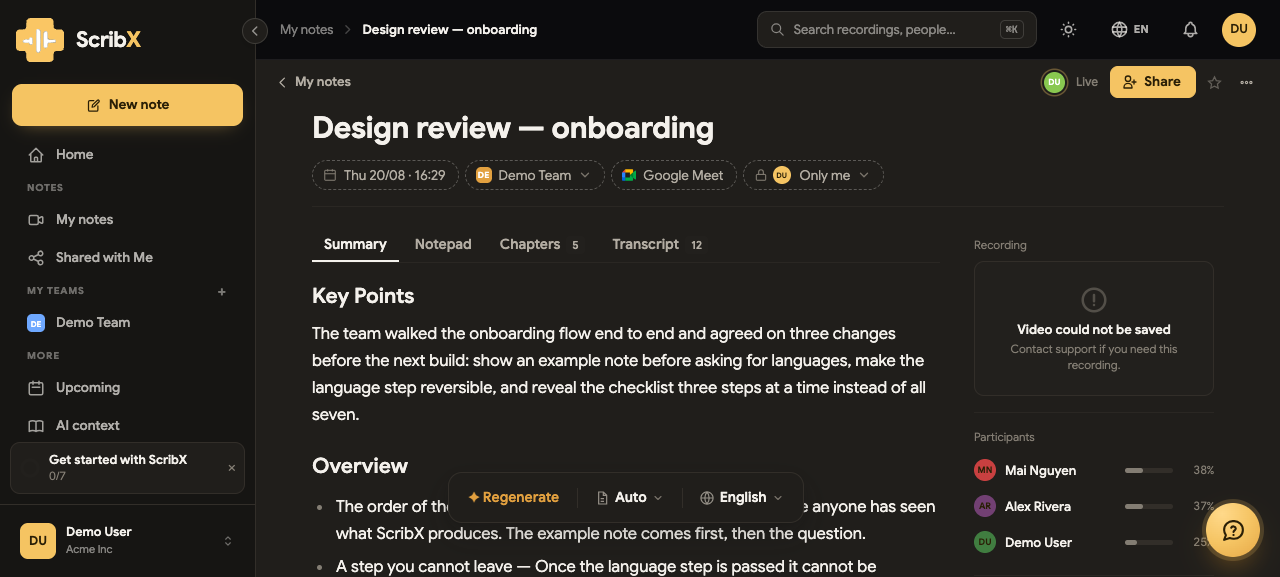 12
12- 1The Summary tab, next to Notepad, Chapters, Transcript
- 2Template button, language button, Copy
The sections come from the meeting's summary template. Every meeting uses General unless someone picks another, and General writes:
- Attendees — the people who actually took part.
- Summary — a few sentences on what the meeting was about and what came of it.
- Decisions — what was settled, and why.
- Action items — who does what, and by when.
- Details — the discussion, subject by subject, with what was said.
- Next meeting — when one was arranged.
Other templates write other sections. For example, a Discovery call summary lists needs, budget and decision-makers. With ScribX layout, ScribX chooses the sections itself. See Summary templates & ScribX layout.
Read it in your language
You can read the summary in English, Vietnamese, Japanese, Korean or Simplified Chinese. The meeting language does not matter.
- In the small toolbar above the summary, click the language button (it shows a language, for example English).
- Choose a language. ScribX translates the whole summary, headings included.
See Languages.
Jump to the moment
Every time mark like 01:57 in the summary is a link. Click it: the transcript and the recording jump to that moment. This way you can check each point against what people really said. Longer meetings use hours too, for example 1:05:30.
Edit the summary
You can change any part of the summary. It works like a normal document editor.
- Open the meeting's note and stay on the Summary tab.
- Click into the text where you want to change something.
- Type your change — for example, fix a name, make a sentence clearer, or change who owns an action item.
- ScribX saves your changes automatically. Older versions are kept in the version history.
If the summary shows a person as "Speaker 1", click that name and type the person's real name. The new name is used everywhere in the note.
Write the summary again
- In the toolbar above the summary, click the template button. It shows the name of the current template, for example General.
- A menu opens. Its title is Regenerate with….
- Choose a template:
- the same template, to write the summary again — for example after you named the speakers or added context;
- another template, to get different sections.
The old summary is not lost. It moves to the version history, with your own edits. Click Restore there to bring it back.
Make it better
The best way to get a better summary is to give ScribX context:
- Add a glossary of product names, people and acronyms.
- Add a team context with the background ScribX cannot hear in the meeting.
- Give one meeting a short brief in its Options before it starts.
Share or copy the summary
- To give other people access to the whole note, click Share at the top right. See Share recordings.
- To paste the summary into an email or document, click Copy in the toolbar. See Copy & download notes.