Share from the extension
You can let other people follow your meeting while it happens. In the ScribX side panel, you copy a share link and a passcode, and send them. People open the link in their browser and read the live transcript. They don't need a ScribX account.
Before you start
- You are in a Google Meet or Zoom call in your browser, with the ScribX extension.
- You started ScribX in this meeting with a bot. Only the person who started ScribX sees the Share button.
- The ScribX side panel is open. If it is closed, click Open sidebar on the ScribX bar at the edge of the meeting page.
Share the live transcript
- At the bottom of the side panel, click Share.
- The Share transcript window opens. It shows the Share link and the Passcode.
- Click Copy link & passcode.
- Paste the text in the meeting chat, an email or a message.
- Click Done.
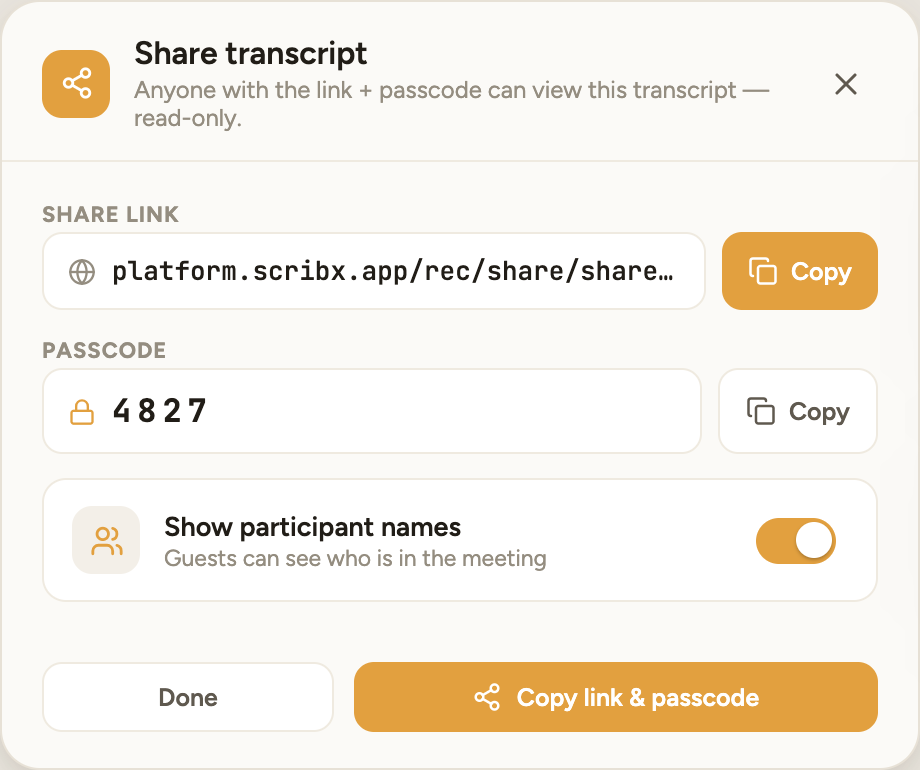 1234
1234- 1Copy the link only
- 2Copy the passcode only
- 3Show participant names
- 4Copy link & passcode
You can also copy only the link or only the passcode with the Copy button next to each one.
Show or hide participant names
The Show participant names switch is on by default. Guests then see who is in the meeting. Turn it off to hide the names from guests. The link and the passcode stay the same.
What guests see
- The guest opens the link in any browser.
- The page asks for the passcode. The guest types it and clicks View Recording.
- The guest reads the transcript. Guests can only read. They cannot change anything.
For other ways guests can join, see Access requests & guest access.
This link and passcode belong to this meeting. Every time you click Share in the same meeting, you get the same link and passcode.
Share with your team
The Share button in the extension is for guests. To share the note with colleagues who have ScribX, open the note in the web app and click Share at the top right. There you can add people, a team or your whole organization. See Share recordings.