Live transcript & translation
While ScribX captures a meeting, the side panel shows what people say as text, a few seconds after they say it. Each line has the speaker's name. ScribX can translate each line into your language, and it writes short chapters during the meeting. You can read along, catch up on what you missed, and follow every speaker without waiting for the meeting to end.
Before you start
- You are in a Google Meet or Zoom call in your browser, with the ScribX extension.
- ScribX is capturing the meeting. See Capture from the extension.
- The side panel is open. If it is closed, click Open sidebar on the ScribX bar at the edge of the meeting page.
The live transcript
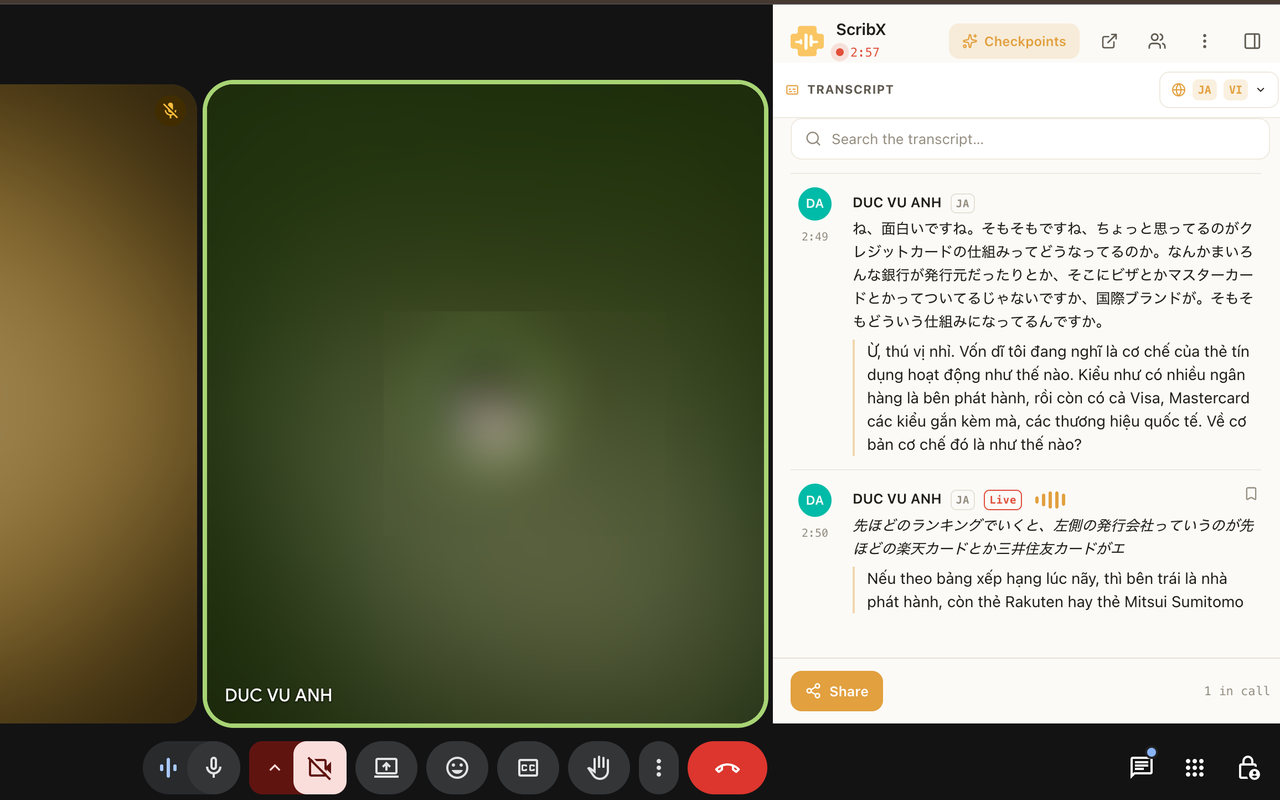 12345
12345- 1Show the chapters
- 2Language you read
- 3Search the transcript
- 4Line still being written
- 5Bookmark this line
What you see on each line:
- The speaker's name and the time in the meeting.
- The text. A line marked Live is still being written, and its words can change. When the speaker finishes the sentence, the line is final.
- The translation, below the original, when translation is on.
Read along during the call:
- The transcript scrolls by itself as people talk.
- Scroll up to read earlier lines. To go back to the newest line, click Jump to live.
Read in your language
- At the top right of the transcript section, click the language button. It shows the language you read now.
- Under I read in, click a language. Click Original to see the words as they were spoken.
- The transcript changes to that language.
In the same menu you can also:
- Click Side by side to open two languages in a separate, large window. See Focus mode.
- Use Text size (− and +) to make the text smaller or larger.
Your choice is only for you. Each person can read the same meeting in their own language.
ScribX translates live only into the languages chosen for this meeting. If you pick another language, you see the original words. The menu tells you which languages are translated live.
Change the meeting languages
If you started ScribX in this meeting, you can change the meeting languages while it runs.
- In the side panel, under the ScribX logo, click the language button (for example EN ⇄ JA).
- Under Meeting languages, pick the languages people speak and read.
- Click Apply. The transcription restarts for about one second. ScribX then shows Languages updated for everyone.
ScribX transcribes and translates English, Vietnamese, Japanese, Korean and Chinese. See Languages.
Search the transcript
- In the transcript section header, click the search icon (a magnifying glass).
- Type a word. The transcript shows the matching lines.
- To close the search, click × or press Esc.
Chapters during the meeting
During the meeting, ScribX writes chapters: a few sentences about each part of the meeting, with the time it started.
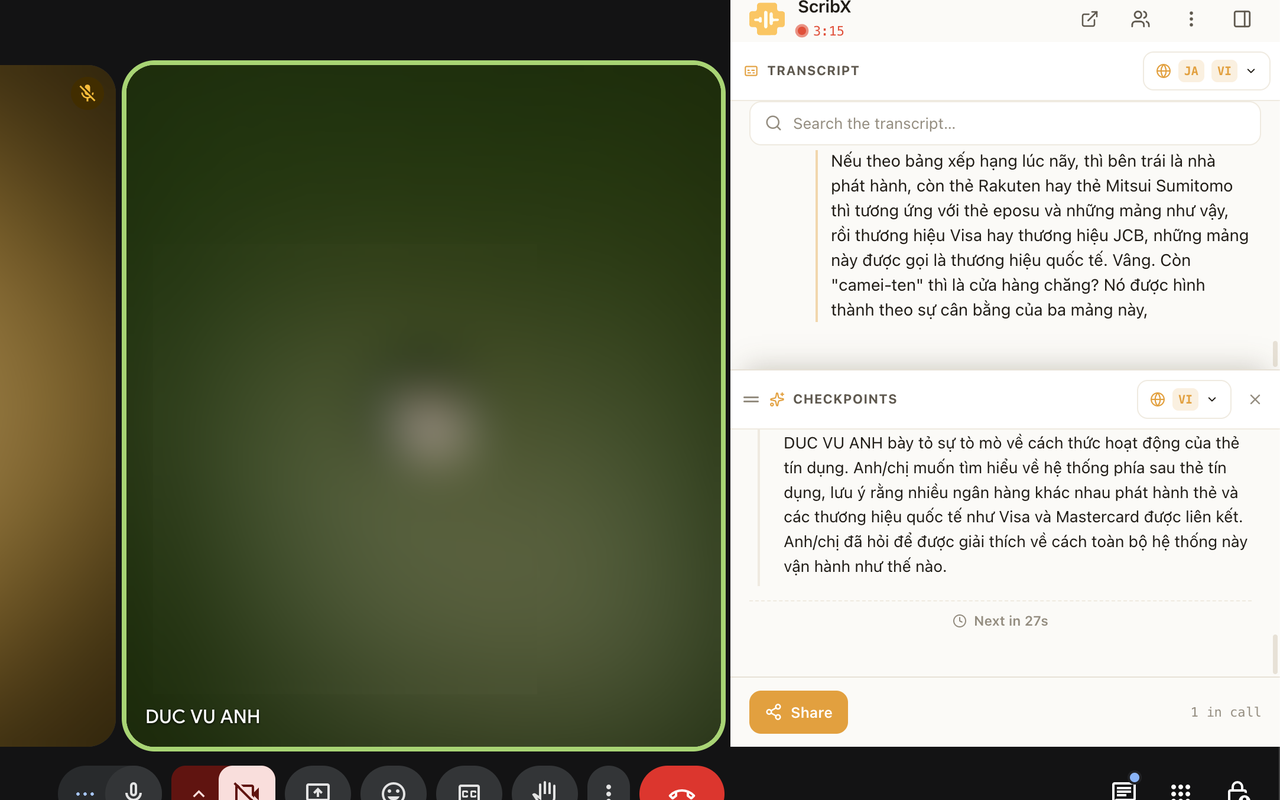
- At the top of the side panel, click the button with the sparkle icon.
- A chapters section opens under the transcript. ScribX adds new chapters as the meeting goes on. A small timer shows when the next one comes.
- To make the section taller or shorter, drag its top edge. To close it, click ×.
After the meeting, the finished note has a Chapters tab. See Chapters.
Say action items clearly, for example "Mai will send the deck by Friday". ScribX then catches them more easily in the chapters and the summary.
Bookmark a line
- Move the mouse over a line. A bookmark icon appears at the top right of the line.
- Click it. The line stays marked, so you can find it again while you scroll.
- Click the icon again to remove the bookmark.
Bookmarks are only in your side panel. They are not saved to the note.
Get better accuracy
Accuracy depends on the sound, the accent and the language. To get the best results:
- Use a good microphone and reduce background noise.
- Add names of products, people and acronyms to your glossary before the meeting.
- Choose the right meeting languages.