Upload a recording
Some meetings ScribX was not in. A call recorded in Zoom's own cloud, a webinar someone sent you, an interview captured on a phone — if you have the file, you can hand it over and get back everything a live capture would have given you: the transcript, the speakers separated, the summary, and the translation.
Drop the file
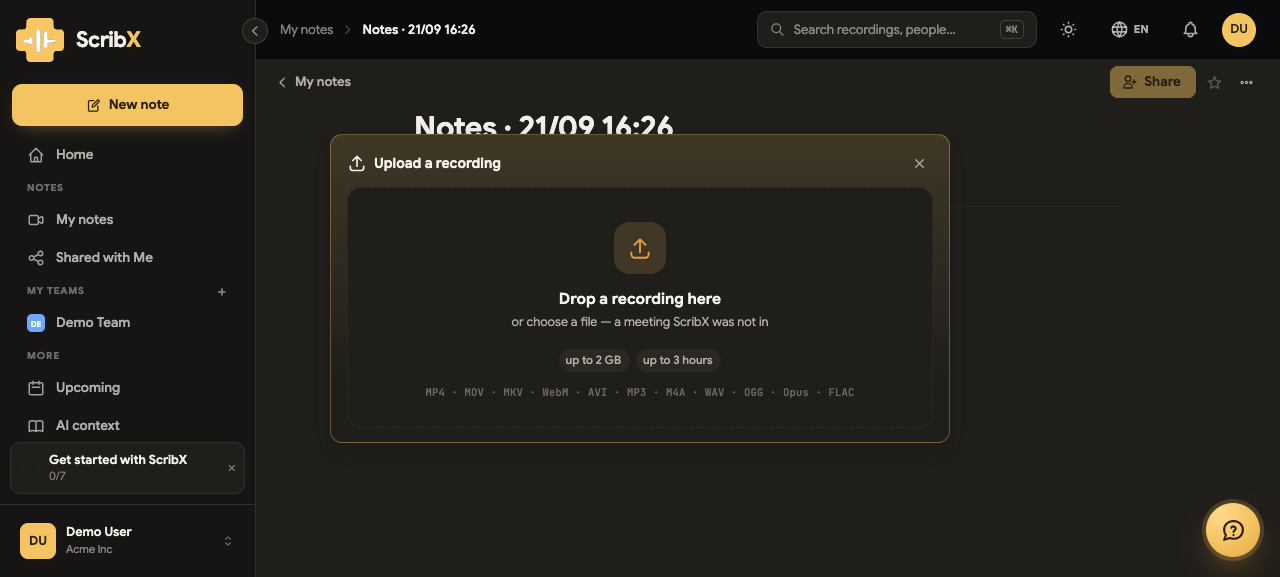
Start a New note, then choose Upload a recording.
 12
12- 1Drop the file here, or click to choose one
- 2What your plan allows, and the formats accepted
Drag the file onto the panel, or click it and pick one. The upload goes straight to storage — it does not pass through the page — so a two-gigabyte file does not tie up the browser, and closing the tab afterwards does not lose it.
What it accepts
The panel says so before you try, rather than after:
- Video — MP4, MOV, MKV, WebM, AVI
- Audio — MP3, M4A, WAV, OGG, Opus, FLAC
and two limits that come from your plan:
| Plan | Largest file | Longest recording |
|---|---|---|
| Free | 500 MB | 1 hour |
| Pro | 2 GB | 2 hours |
| Team | 2 GB | 3 hours |
| Enterprise | no limit set | no limit set |
An organization can be given different numbers — ask whoever administers yours. A file that is too big or too long is refused with the reason, before anything is uploaded.
ScribX keeps the file you gave it. Nothing is re-encoded over the top of it, and nothing is deleted except by your organization's normal retention window.
What happens next
The note opens straight away and tells you which stage it is in — you do not have to wait on the page:
- Uploading — the bytes going to storage.
- Converting — the audio pulled out of the file for transcription. A one-hour video becomes a few megabytes of audio, which is why this is quick even for a large file.
- Transcribing — the words, with the speakers separated.
- Summary — the write-up, once the transcript is whole.
- Translating — if the note is set to more than one language.
The transcript is never held up by the video. Making the recording playable happens beside the transcription, never in front of it.
Playing it back
Most files play in the page as they are. Some need their index moved to the front first — a mechanical rewrite that takes about three seconds per hour of video and changes nothing about the picture or the sound. A few containers no browser can play (.mkv, .avi, .wmv) are kept and downloadable, and the page says plainly that the video will not play here — the transcript, the summary and the audio are all there regardless.
Speakers
An uploaded file has no participant list to borrow, so ScribX separates the voices itself and calls them Speaker 1, Speaker 2 and so on. You can rename them, and the names carry through the transcript, the summary and the participants list.
If your organization uses voiceprints, enrolled people are named automatically instead.