AI Meeting Notes (capture a tab)
AI Meeting Notes is ScribX's no-bot capture: it records a Chrome tab (an online call you're in) or your microphone (an in-person meeting) and transcribes & translates it live. Nothing joins the call, no link needed — the fastest way to try ScribX.
Start a capture
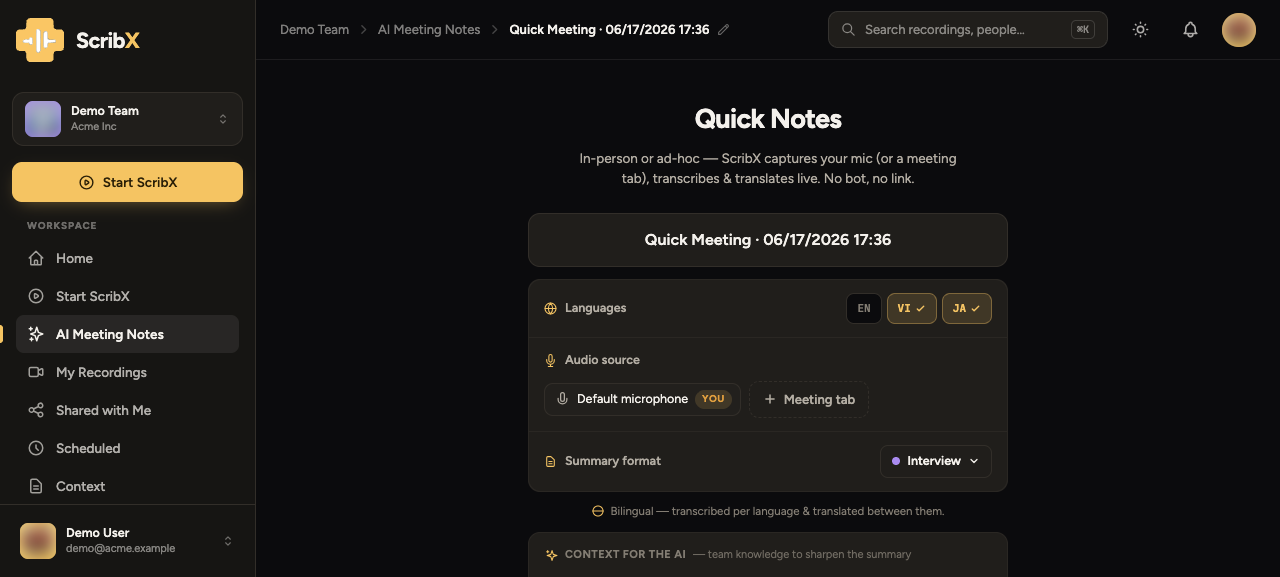 1234
1234- 1Open AI Meeting Notes (Quick Notes) from the sidebar
- 2Audio source — your mic (in-person) or a meeting tab (online call)
- 3Set the languages spoken in the meeting
- 4Pick the summary format
- In the web app, open AI Meeting Notes (from the sidebar or the Start ScribX → AI Meeting Notes tab).
- Choose the audio source:
- Default microphone — for an in-person meeting (put the room on speaker).
- Meeting tab — to capture an online call you're already in.
- Set the languages and summary format, confirm the consent check.
- Click Start transcribing — the live transcript begins.
Keep the tab open
AI Meeting Notes captures your tab, so keep it open until you end the call. Need to walk away or can't keep the tab open? Send a bot instead.
After the meeting
Stop the capture (or end the call) and open your library — the recording, transcript and AI write-up are there in seconds.