v2.33.0 · Every meeting is a note you can write in

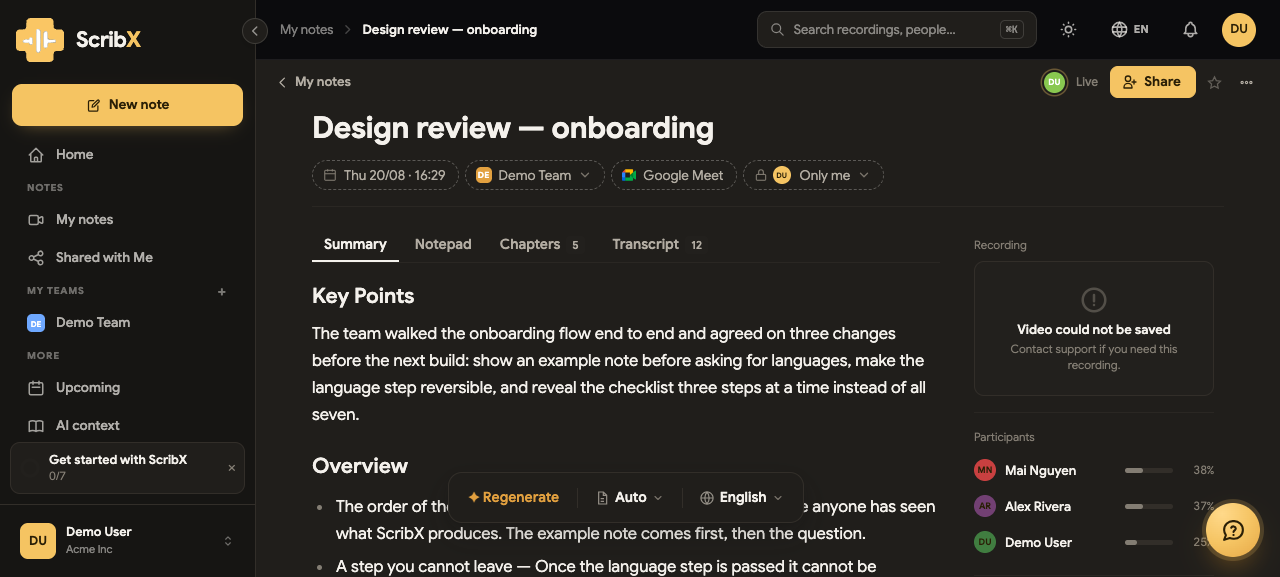
A meeting no longer opens as a recording with notes attached. It opens as a note — one page holding the summary ScribX writes, the notes you type, the chapters and the full transcript, with the recording and the people beside them. You can write in it before the meeting starts, during it, and after; and so can your colleagues, at the same time.
Around that: a meeting can now be held in every language we support and read in whichever one you like, you can hand ScribX a recording it was never in, and the library has become a place with folders in it.
Web App
New
- Every meeting is a note — One page for the whole meeting: the Summary, your own Notepad, the Chapters and the Transcript, with the recording and the participants in the rail. The page does not change when the meeting ends; it simply gains its summary. See The note page.
- Write together, live — Two people can take minutes in the same Notepad at once, each cursor carrying its owner's name. It keeps working offline and sends what you typed when the connection comes back. See Working together.
- Version history, twice over — What you wrote and what ScribX wrote keep separate histories. A version is kept whenever the page has been still for a while, you can see what changed between any two, and restoring one is an ordinary edit you can undo. See Version history.
- Upload a recording — A meeting ScribX was never in: a Zoom cloud file, a webinar, an interview on a phone. Drop it in and get the transcript, the speakers separated, the summary and the translation. Up to 2 GB and three hours, depending on your plan. See Upload a recording.
- A library with folders in it — My notes replaces My Recordings, your own pages and your teams' pages have their own addresses, and a folder is a place you come back to. A folder also decides who reads what goes into it — start a note inside a team's folder and it is shared with that team from its first second. See Folders.
- 简体中文 — Chinese joins English, Vietnamese, Japanese and Korean across the interface, transcription, translation and summaries.
- A meeting in as many languages as it needs — Not two any more. Name every language the call will be spoken in and ScribX transcribes each of them, translating between them as it goes.
- Read it as it was spoken — The transcript's reading language is yours alone, and As spoken is one of the choices: every line in the language it was actually said in. Pick a language instead and the rest is translated, with a mark on the lines that are translations. If part of the meeting has not been translated yet, the row that needs it says so and offers to finish the job. See Languages.
- Get started, with credits for it — A seven-step checklist, each step checked against what actually happened rather than ticked by visiting a page, and credits for finishing them. See Your first week.
- Meetings name themselves — A meeting takes its name from the calendar event or from its own name in Zoom, so the library stops being a wall of dates.
- Integrations, in one place — A marketplace for the tools ScribX connects to, and a help panel that floats over the page with the handbook inside it.
Improvements
- Schedule means one meeting; the arrow means all of them — A repeating meeting made "Schedule" ambiguous, so the button now asks, and says how often the meeting repeats before you agree to every occurrence.
- A meeting somebody else booked says so — It reads Already taken, and tells you that you will be able to open the recording when it is ready, instead of failing into a log line nobody reads.
- Auto-schedule keeps its word — Switching it off, or narrowing the rule, now takes back the meetings it had already booked. Keeping them is a choice you make, not the default. Each calendar states its rule in a sentence. See Scheduled & calendar.
- Sharing adds people as chips — Type a name, it finds them, and they sit in the field until you confirm. Nobody is emailed because you were halfway through a thought.
- A sidebar of what you use — What is used every day sits at the top; the rest moved to where people were looking for it.
- Pick a date range on a calendar — Rather than typing
dd/mm/yyyy. And the way out of a narrowed list is findable, next to the filters it clears. - Meeting stills on one grid — The library shows a frame from each meeting, so a page of cards tells you which is which.
Fixes
- The live transcript no longer freezes and then arrives in a burst — Audio was queuing behind a blocking send during reconnection; measured backlog ran to 35 seconds.
- One clock per recording — A re-transcribed meeting was writing relative timestamps into a
field holding absolute ones, so its lines read as
0:00and as a date 56 years away. 61 recordings repaired. - A line no longer opens with the turn before it — And the transcripts that had been damaged that way were repaired in place.
- A signup no longer puts credits in the wallet it should not have — The Free plan's allowance is the allowance; it was also seeding the permanent balance.
- Shrinking a recording can no longer destroy it — The re-encode replaced the file before confirming the new one was sound.
For administrators
- Set a customer up before they have signed up — The platform console can create an organization, invite people into it (or into one of their own), claim its email domains, and lock an account from the list where you actually look somebody up.
- Take credits back — Not only grant them. A deduction stops at zero, and a grant that has an expiry is revoked on its own row.